

Before you can play for real money on DmPlay, you need to add funds to your account, and when you win, you need a way to take money out. Both steps are done inside the app or on the website, and neither one is complicated once you know where each button is. This guide explains how to deposit, how to add your bank account, and how to withdraw, step by step, so you can handle your money with confidence.
Getting Ready: Log In First
Open the app or the website and log in with your mobile number, using either the OTP or your password. Make sure you are on the official DmPlay Game site or app. Never enter your login or payment details on a page that someone sent you in a chat message. Once you are logged in, you will see your wallet or balance section, usually on the home screen or in your account menu.
Step 1: Open the Deposit Section
Tap the Deposit button or open the wallet section and choose Deposit. You will see the available payment methods. DmPlay accepts UPI, Net Banking and digital wallets, so pick the method you already use every day. If you are new to online payments, UPI is usually the simplest choice because most people already have it set up on their phone.
Step 2: Enter the Amount
Type in the amount you want to add. Start small if this is your first deposit. Check the amount twice before you continue, because a wrong digit is easy to miss. The deposit screen will show you the payment options for that amount. If a minimum or maximum limit is shown, keep your amount inside it. Limits can change, so always go by what the app shows at the time.
Step 3: Complete the Payment
Follow the on-screen steps for the method you picked. For UPI, this usually means approving the payment in your UPI app. For Net Banking, you will log in to your bank and confirm the transfer. For a digital wallet, you confirm the payment inside the wallet app. Wait for the confirmation message and check your DmPlay balance. The money usually appears quickly, but if it takes a few minutes, wait before you try again so you do not pay twice.
Step 4: Add Your Bank Account
Before your first withdrawal, you need to add your bank account details. Open the bank account or withdraw section in your account settings. You will be asked for the account holder name, the bank name, the account number and the IFSC code. Type each detail exactly as it appears on your bank records. The holder name must match your own bank account, and the IFSC must be correct, because a wrong IFSC can send your money to the wrong branch. Double-check every field, then save the details.
Step 5: Request a Withdrawal
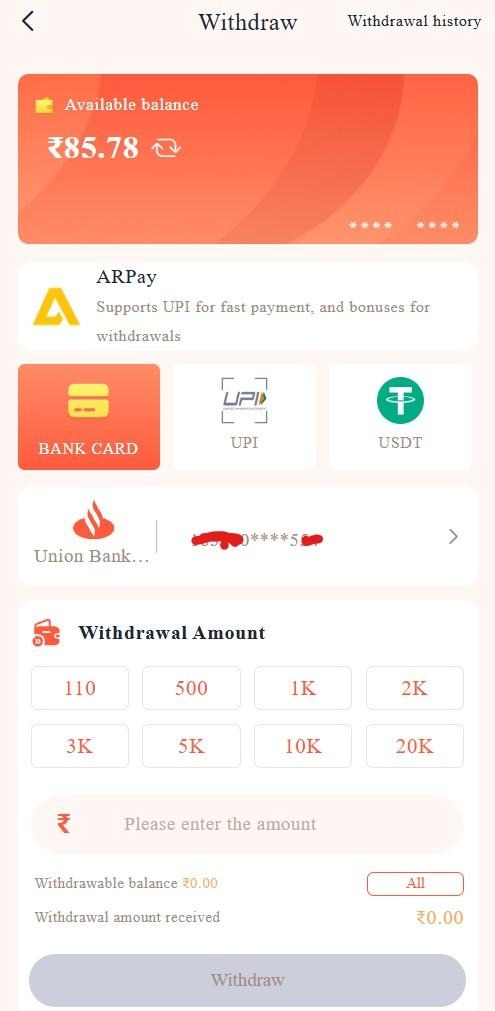
Tap Withdraw in the wallet section and choose where the money should go: your bank account or your UPI. Enter the amount you want to take out. The minimum withdrawal is 100 rupees according to the site, but limits may vary, so check the figure shown in the app before you confirm. Make sure the amount is within your available balance, then confirm the request. You will get a confirmation message, and the money is sent to the account or UPI ID you selected.
Common Problems and Easy Fixes
If a deposit does not appear, first check your bank or UPI app to see whether the money actually left your account. If it did, wait a short while and check your DmPlay balance again, then look at the transaction history. If a withdrawal fails, the usual cause is a wrong bank detail. Open your saved bank details, check the account number and IFSC against your passbook or banking app, correct any mistake, and try again. If the problem continues, contact support through the official channels with your transaction details ready.
Conclusion
Depositing and withdrawing on DmPlay is a simple routine once you have done it once: log in, deposit through UPI, Net Banking or a digital wallet, add your bank account with the holder name, bank name, account number and IFSC, and withdraw to your bank or UPI when you are ready. Check every detail before you confirm, keep your login private, and remember that the minimum withdrawal is 100 rupees, with exact limits shown in the app.

